Intro
This guide is for senior B2B marketers who already run email at scale and need a repeatable way to refresh an aging list without turning it into a once-a-year scramble. It focuses on the operational sequence: inventory, consolidation, hygiene, validation, ICP rematching, enrichment, re-permissioning, and re-engagement. You can run it end to end as a quarterly or annual reset, or use individual sections as lightweight monthly maintenance.
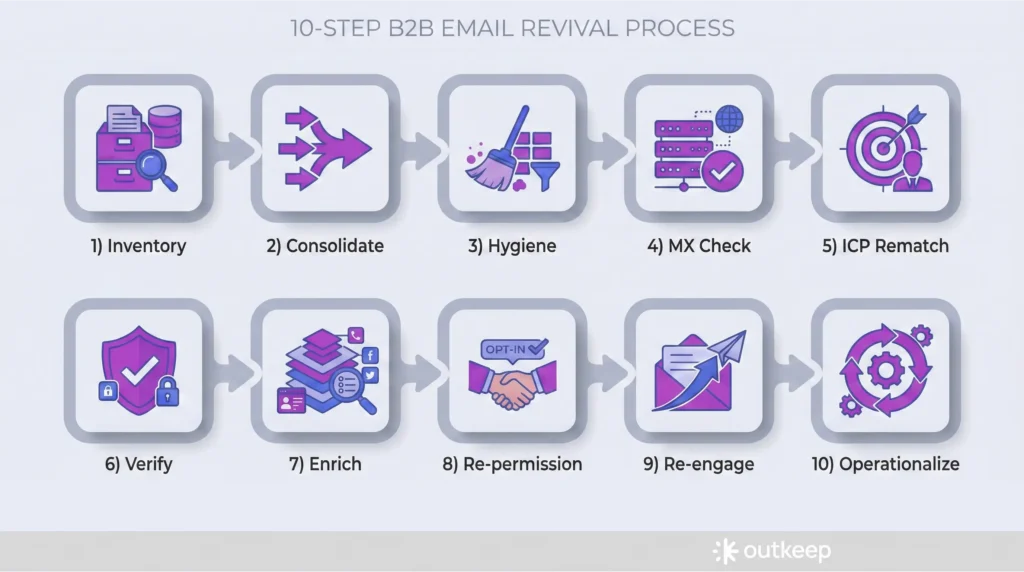
1. Inventory data sources, list size, ownership, and program signals
Purpose
Inventory is where you get clarity on where data lives, how much of it exists, and the current health of the program. It also forces decisions around budget and ownership.
Execution
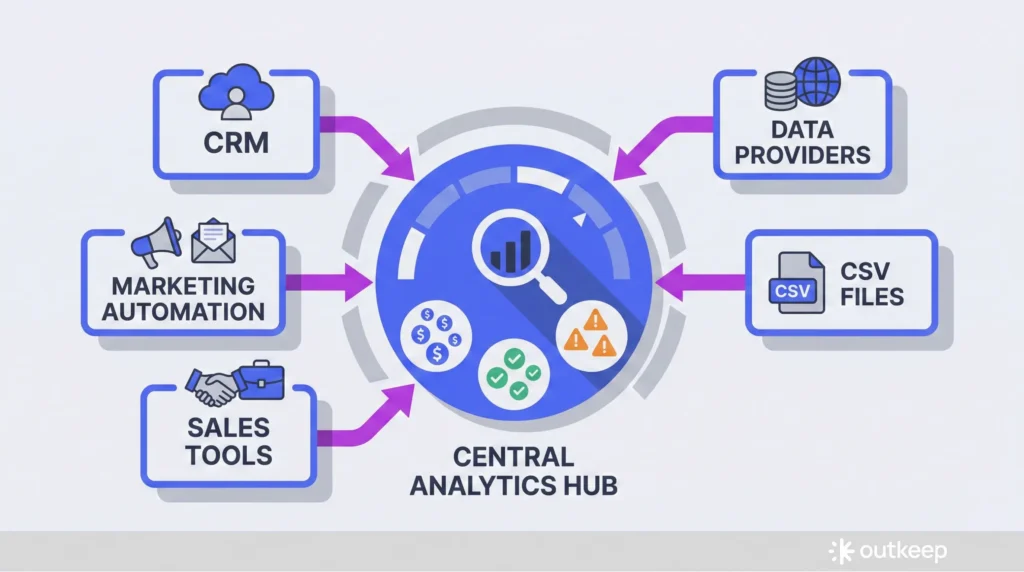
Start by mapping every system that contains contacts or can send email:
- Marketing automation platform
- CRM (typically the system of record)
- Sales engagement or sequencing tools
- Data providers you already pay for
- Historical CSV imports
The goal is not a perfect diagram, but a practical list of sources and which one is the system of record.
Once sources are mapped, count records and constraints:
- How many contacts exist across systems
- How many you are actively paying for
- What verification or enrichment credits you already have
- Budget assumption: a few cents per record, often 5 to 10 cents range
In parallel, pull current program health signals:
- Review bounce history, unsubscribes, spam complaints
- Pull deliverability indicators
- Conduct a quick content audit focusing on unique clicks by real people, not open rates
- Identify which emails and assets consistently drove engagement
Notes
Do not skip the ownership decision. Whether this lives with a marketing coordinator, RevOps, Sales Ops, an external vendor, or a sales leader, the requirement is time and technical competence. Strong inventory work reduces cost and complexity in every step that follows.
2. Consolidate, normalize, and deduplicate in the system of record
Purpose
Consolidation and deduplication form the foundation of the entire process. Skipping this step increases verification costs, enrichment costs, and segmentation errors.
Execution
Work toward a single source of truth, usually the CRM, with clean sync behavior to marketing automation and sequencing tools.
Key actions:
- Use native duplicate management tools where possible
- Manually merge records when automation falls short
- Dedupe inside the system of record to preserve associations (deals, activities, lifecycle history)
- Normalize key fields used later for segmentation and scoring:
- Company domain and name
- Job title and seniority
- Industry
- Employee count
- Revenue bands
- Geography
Notes
If this has not been done regularly, it is common to find thousands of duplicate contacts and companies. Treat this as foundational work, not cosmetic cleanup.
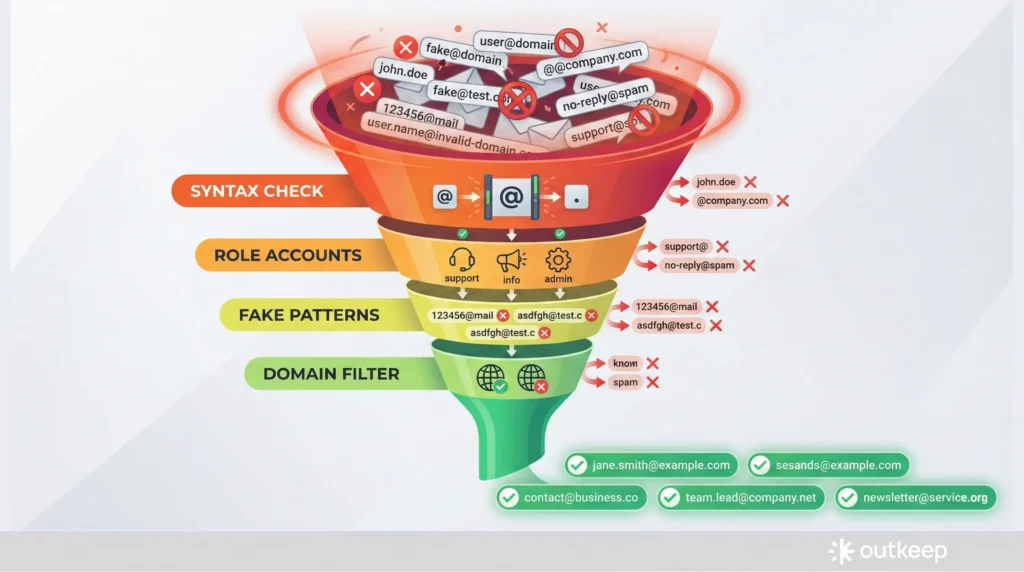
3. Apply basic hygiene filters before spending money
Purpose
Basic hygiene removes obvious junk and non-targets, and reduces the number of records you pay to validate and enrich.
Execution
Remove role-based addresses that do not belong in B2B nurture programs:
- info@, sales@, support@, procurement@, finance@
Remove invalid syntax:
- Missing or multiple @ symbols
- Invalid characters
Filter out clearly fake patterns:
- Long numeric strings in the local part (five or six consecutive digits almost always indicate junk)
Apply domain-level filters:
- If you do not sell into education or government, .edu and .gov domains
- Personal email domains for strictly B2B programs: gmail.com, hotmail.com, outlook.com, yahoo.com (isolate rather than delete, potentially append business addresses)
Prevention strategy:
- Enforce capture rules on forms so personal domains are rejected or discouraged at the source
Notes
Most of this work can be done with minimal cost using spreadsheets, simple rules, and native platform functionality. The goal is to remove cheap, obvious problems before running paid validation.
4. Run technical validation with MX checks
Purpose
MX checks confirm whether a domain is configured to accept email and has a real mail server behind it. This is the first true deliverability filter.
Execution
Key steps:
- Run explicit MX pass on large or neglected lists (many tools like Apollo and Instantly perform this automatically, but explicit verification is worth it for cleaning projects)
- Suppress domains that fail MX checks before moving on to paid verification
- Understand that MX checks filter out more addresses than expected, especially in lists stitched together from multiple sources
Notes
MX checks are not a substitute for verification. They are a low-cost gate that reduces paid work downstream.
5. Rematch the list to your current ICP
Purpose
Your ICP evolves, but databases accumulate legacy contacts that no longer fit. Rematching keeps your sending audience aligned with who you want to reach today.
Execution
Process:
- Load the cleaned subset into your data provider or enrichment tool
- Reapply the filters you would use if building the list today:
- Industry
- Revenue range
- Employee count
- Geography
- Tech stack (if relevant)
- Job function and seniority
- Move clear non-fits out of active sending segments
- Preserve them in an inactive or archived state so history is retained
Notes
This step prevents relevant content from being sent to irrelevant subscribers and reduces risk when consistent cadence resumes.
6. Verify emails with a dedicated provider and handle catch-alls explicitly
Purpose
Paid verification catches invalid and risky addresses after low-cost filters are complete, and surfaces catch-all behavior that requires deliberate handling.
Execution
Run the ICP-aligned list through a dedicated verification provider:
- Common providers: ZeroBounce, NeverBounce, MillionVerifier, IPQS, Email Oversight
- Pricing: Typically well under a cent per email at scale (tens of thousands of records usually cost hundreds of dollars, not thousands)
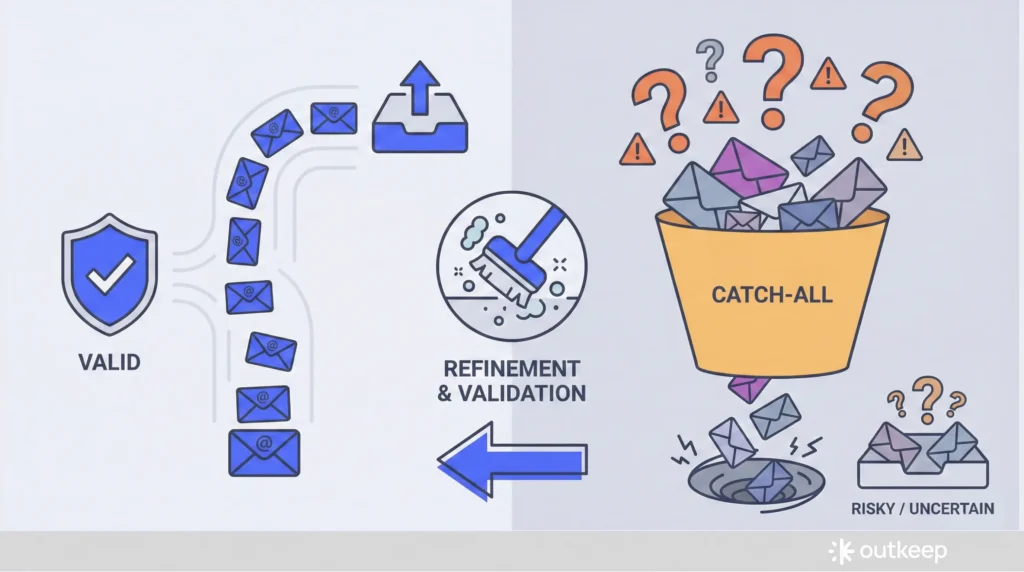
Results categories:
- Valid
- Invalid
- Risky
- Catch-all
Catch-all domains deserve special attention:
- A catch-all accepts all email regardless of whether a specific mailbox exists
- Mail can be accepted even when the intended recipient left the company years ago
- If budget allows, use a tool like Scrubby to run additional refinement and assess whether a real mailbox likely exists
Notes
The reason for doing cheap cleaning first is to pay for verification only on addresses that are syntactically valid, ICP-aligned, and plausibly useful. Mail accepted by a server does not guarantee delivery to a real person.
7. Enrich late, and only enrich the subset you intend to keep active
Purpose
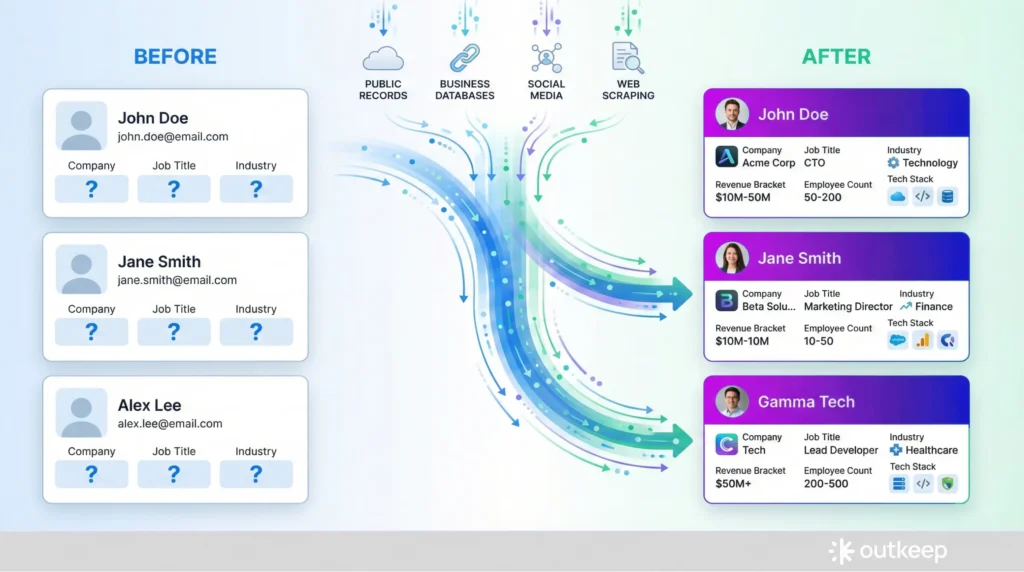
Enrichment is the most expensive step. The operational goal is to enrich the smallest, cleanest subset possible, as late in the sequence as you can.
Execution
After hygiene and verification, enrich fields you actually use:
Company-level data:
- Industry classification
- Revenue bands
- Employee count
- HQ location
- Tech stack
Contact-level data:
- Department
- Seniority
- Job title normalization
Tools: Waterfall enrichment tools like Clay, FullEnrich, Databar, Datasys, Genesy, and Apollo’s waterfall enrichment can help, but sequencing matters more than tool choice.
During enrichment, watch for:
- Job changers who moved to new roles or companies that still fit the ICP (update and keep active)
- Job changers who no longer fit (move out of primary sending)
- Retirees
Notes
You may choose to rematch to ICP again after enrichment, since new firmographic data can change fit. The principle remains the same: do not burn credits enriching records you would not send to.
8. Re-permission most of the list using one-to-one style sequences
Purpose
Re-permissioning is both a courtesy and a deliverability safeguard, especially if the list has not been mailed consistently. Unless a contact is recently opted-in and highly engaged, assume they should go through it.
Execution
Setup:
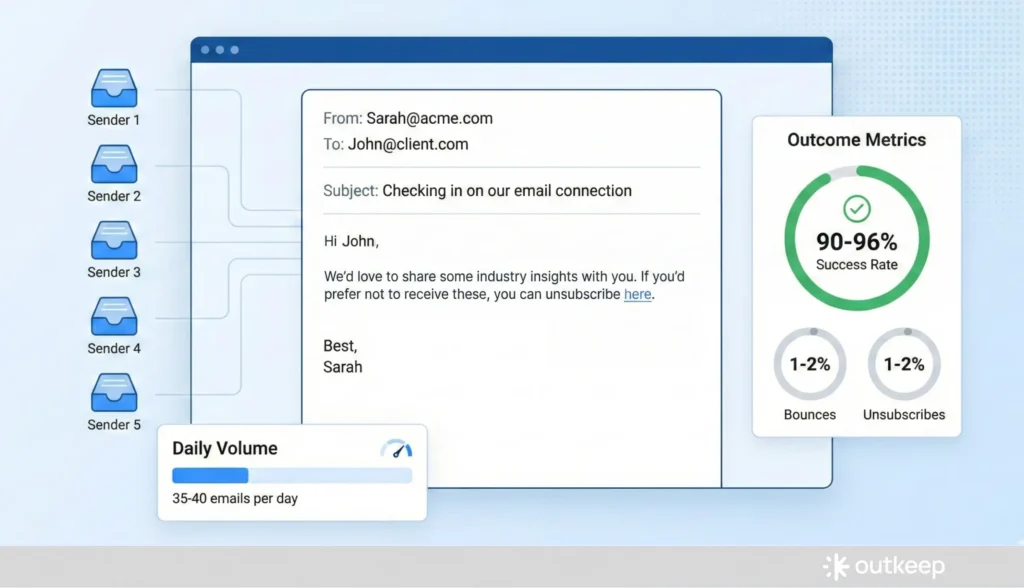
- Use one-to-one style sequences sent from real inboxes rather than bulk HTML campaigns
- Configure messages to be plain-text or near plain-text with minimal tracking and no heavy templates
- Keep volume conservative: a couple dozen emails per day per inbox, up to roughly 35 to 40
- For larger lists, distribute sending across three to five inboxes
Message approach:
- Explain that you are cleaning the list
- State that you respect their inbox and privacy
- Express desire to continue sending useful content
- Provide a clear opt-out
- Everyone else is implicitly re-permissioned
Notes
Expect roughly 1 to 2 percent bounces and 1 to 2 percent unsubscribes. This is normal. The result is usually a 90 to 96 percent deliverable cohort that is safe to include in bulk marketing sends.
9. Re-engage with either an updated cadence or a short reintroduction drip
Purpose
After re-permissioning, you need a controlled way to reintroduce content and reestablish engagement patterns.
Execution
Two options:
Option 1: Direct enrollment
- Enroll re-permissioned contacts directly into your regular newsletter or content cadence (assuming consistency and quality are strong)
Option 2: Dedicated re-engagement drip
- Run a 3 to 6 week series that reintroduces your brand and best work
- Lead with evergreen assets that already proved they drive engagement:
- Deep-dive articles
- Frameworks
- Case studies
- Benchmarks
- Roundups
- Avoid hard sales
- Vary topic and format so different parts of the audience have reasons to re-engage
- Use performance to guide what you create next
Notes
Design re-engagement around unique clicks and demonstrated interest, not open rates.
10. Operationalize cadence, suppression, and market focus (TAM, SAM, SOM)
Purpose
The objective is to make list refresh an ongoing motion rather than an annual project, and to align the database with what you can realistically serve and win.
Execution
Establish consistent sending:
- Email your cleaned, ICP-aligned list weekly or at least bi-weekly
- Consistency matters for mailbox providers and reduces risk from spikes or long gaps
- Regular sending acts as a self-cleansing mechanism (bounces, unsubscribes, and disengagement surface naturally)
Manage engagement:
- Periodically suppress low and no-engagers from active sending without deleting them
- Archive or mark inactive, then decide whether to attempt re-engagement later via targeted sequences
- Avoid excessive micro-segmentation and constant one-off campaigns
Focus on serviceable market:
- Be explicit about TAM, SAM, and SOM
- Total Addressable Market (TAM): The theoretical maximum market, every possible customer who could buy what you sell if there were no constraints
- Serviceable Addressable Market (SAM): The subset of TAM you can realistically serve given your product’s segments, geographies, regulatory constraints, and vertical focus
- Serviceable Obtainable Market (SOM): The portion of SAM you can realistically capture in the near to mid term given current resources, brand, and go-to-market reach
- The entire workflow exists to move the database from vague TAM volume toward focused SAM and SOM
Notes
B2B data decays quickly. Roughly 20 to 25 percent of contacts change jobs or retire each year. It is common for a large list to shrink dramatically after proper deduping, cleaning, rematching, and re-permissioning. Archive data rather than deleting it, but do not cling to contacts that cannot be validated, never engage, or no longer fit the current market.
Context on Outkeep’s Approach
Outkeep’s team has spent years inside B2B revenue organizations rebuilding audience and data operations, including ongoing hygiene, job-change handling, and re-engagement. That operator experience informs the emphasis on sequencing, consistency, and keeping the database aligned with what a team can realistically serve and win.
FAQ for Modern B2B Email Programs
1) How often should a B2B team do list hygiene and re-engagement work?
Continuous or at least monthly hygiene is the baseline. Infrequent cleanups compound decay and cost.
2) Why are open rates unreliable for content audits?
They are noisy and easily skewed. Unique clicks by real people are a more meaningful engagement signal.
3) What is an MX check and where does it fit?
An MX check confirms a domain can accept email. It usually comes after basic hygiene and before paid verification.
4) What is a catch-all domain and why is it risky?
Catch-alls accept all email even if a mailbox does not exist, which can mask stale or invalid contacts.
5) Should off-ICP or unengaged contacts be deleted?
Generally no. Archive or mark inactive rather than deleting outright.
6) What bounce and unsubscribe rates are normal during re-permissioning?
About 1 to 2 percent for each is normal and healthy.
7) What is TAM?
Total Addressable Market (TAM) is the theoretical maximum market: every possible customer in the world who could buy what you sell if there were no constraints.
8) What is SAM?
Serviceable Addressable Market (SAM) is the subset of TAM you can realistically serve, given your product’s segments, geographies, regulatory constraints, vertical focus, and operational capabilities.
9) What is SOM?
Serviceable Obtainable Market (SOM) is the portion of SAM you can realistically capture in the near to mid term, given your current resource levels, brand recognition, and go-to-market reach.
10) How do TAM, SAM, and SOM apply to list management?
The workflow shifts the database from broad TAM volume toward a focused SAM and SOM. This ensures you’re maintaining contacts you can both serve and realistically win, rather than holding onto everyone who ever downloaded a whitepaper.