Intro
This guide is written for experienced B2B marketers who already run email programs, manage real content engines, and operate inside MAPs, CRMs, and broader go-to-market systems. It focuses on how to structure email so it feels peer-level, sets clear expectations, reduces friction, and produces signal you can use across programs.
I wrote this so you can use it like a checklist. Read it end-to-end, or grab the sections you want to test next.
1. What This Guide Covers and How to Use It
This is a framework for turning email into a repeatable learning system. The goal is consistent signal, not one-off campaign wins.
The Issue
Most teams already have the tools, content, and workflows. The problem is that email still gets treated like a promotion channel. That creates inconsistent quality, fragmented learning, and a hard time answering the simple question: what is our market actually responding to?
The Principle
Treat email as a structured learning loop, not a promotion engine.
How to Execute It
- Decide the purpose of each send before you write a word. If you cannot state the purpose in one sentence, the email will drift into “kinda about everything,” and the results will be hard to interpret.
- Keep the audience, topic, and CTA tightly scoped. If you want clean signal, you cannot run multi-topic, multi-CTA emails and expect clarity in the data.
- Use a consistent layout and framing so trends are meaningful. When every email looks different, performance becomes noise.
- Measure engagement to understand what topics and formats your market leans toward. Save those insights and reuse them across content planning, sequencing, retargeting, and overall positioning.
2. B2B Email Is Transitioning to Peer-to-Peer
Buyers are tired of marketing emails that feel automated, overproduced, and agenda-driven. Peer-to-peer email wins because it is clear, human, and predictable.
The Issue
Email programs tend to drift toward templates, automation, and internal agendas instead of reflecting how real buyers evaluate information and build trust. In enterprise and high-consideration B2B, demo-first cold sequences almost never work, and traditional marketing-heavy sends tend to produce high unsubscribes.
The Principle
Operate from the subscriber’s point of view by focusing on clarity, relevance, and predictability. The goal is to sound like a peer who knows the space, not like a campaign.

How to Execute It
- Anchor each send in a useful, specific idea, not a general campaign theme.
- Write in a peer-to-peer voice that respects attention and context. This is the “stop selling, start helping” posture. A useful analogy is the doctor visit. You do not start with surgery. You start with diagnosis, context, and trust. Enterprise buying works the same way.
- Avoid unnecessary friction early in the relationship. If the first experience is “click here” and the next page asks for more information, you are creating anxiety, not trust.
- Structure content to confirm expectations set in the inbox. The reader should never wonder, “Why did I open this?”
- Let performance guide where the program evolves rather than assumptions. You will learn faster when each send is simple enough to interpret.
3. Defining Audience and Segmentation Before You Write
If you try to speak to everyone, you usually end up resonating with no one. Tight segments create clearer copy and better signal.
The Issue
When a single email tries to speak to multiple personas or industries, the message becomes diluted and harder for any single recipient to value. You might feel like you are being efficient, but you are often lowering relevance for everyone.
The Principle
The narrower the audience, the clearer the message.
How to Execute It
- Choose one segment per send, even if segments overlap. Clarity beats coverage.
- Align each message to the realities, language, and priorities of that specific audience. “For manufacturers” and “for demand gen teams” are not just labels. They are different contexts, different constraints, different triggers.
- Use recent data or known context to calibrate tone and content. That can be role, industry, lifecycle stage, or behavior. If you do not have good context, keep the message even simpler.
- Avoid mixing unrelated topics in one email. If you want to test topic resonance, keep the topic clean.
- Reuse a single asset multiple times across segments by rewriting the framing, not the content. Most teams underuse good assets because they only write one version of the email around them.
4. Subject Lines and Pre-Headers That Set Clear Expectations
You have less than a second in the inbox. Clear beats clever, and the pre-header is part of the message, not an afterthought.
The Issue
A strong message still fails if the subject line and pre-header do not set the right context, or if they feel disconnected from the content inside. You can have great content and still lose because the first impression was vague, clever, or misleading.
The Principle
Clarity outperforms cleverness in the inbox.
How to Execute It
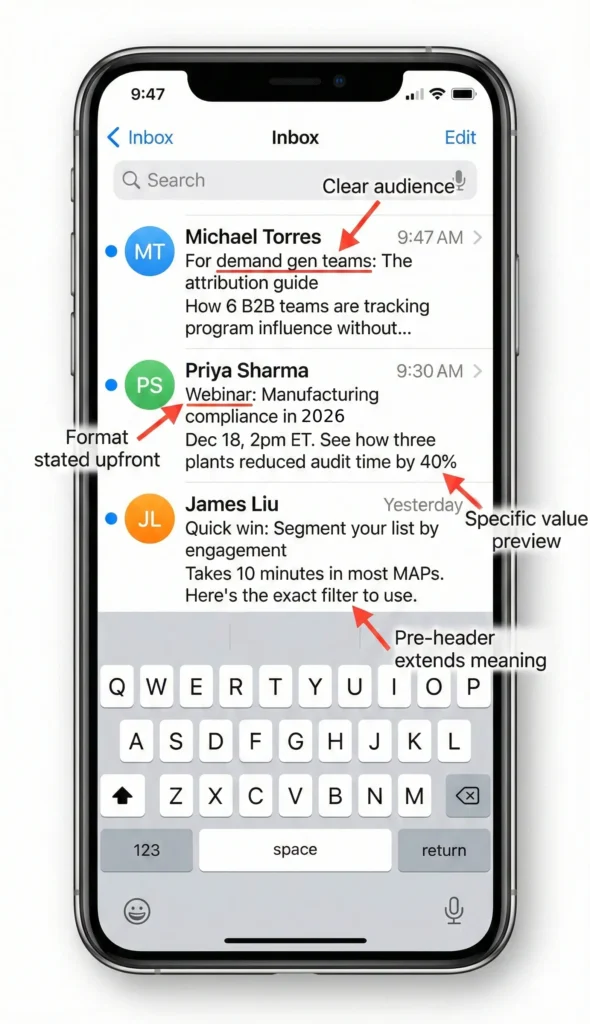
- Write the subject line and pre-header together as a single thought. These two lines are doing the work of earning attention.
- State the topic plainly so the reader knows what they will get when they open. If it is a webinar, say webinar. If it is a guide, say guide. If it is a checklist, call it a checklist. If you are targeting a segment, say who it is for right away.
- Avoid vague phrasing or creative ambiguity. The moment the reader feels tricked, you lose trust. That shows up as unsubscribes and complaints, not just lower click rates.
- Avoid vague phrasing or creative ambiguity. The moment the reader feels tricked, you lose trust. That shows up as unsubscribes and complaints, not just lower click rates.
- Use pre-headers consistently to extend meaning instead of repeating the subject. The pre-header should add context or value, not echo the first line.
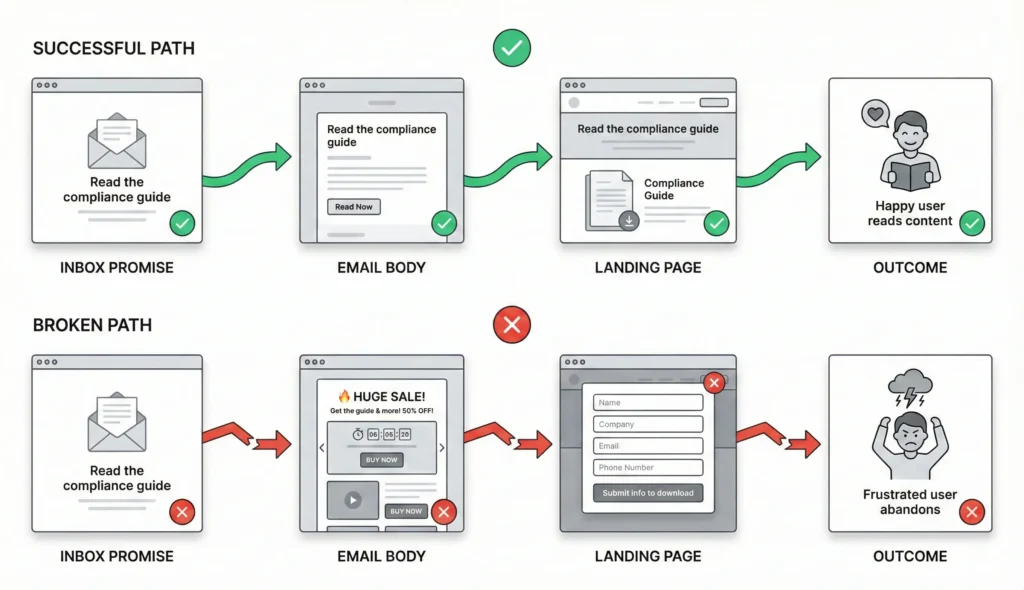
- Confirm that the landing experience delivers exactly what these two elements promise. If the inbox says “read now” and the landing page says “fill out this form,” the experience is broken.
5. Maintaining Continuity From Inbox to Landing Page
Most drop-off happens when the experience changes tone or asks for too much too fast. Continuity is what keeps trust intact.
The Issue
Engagement breaks when subject lines, body copy, CTAs, and landing pages feel disconnected, or when the journey escalates commitment too quickly. Most programs do not lose people because the content is terrible. They lose people because the experience breaks trust in small ways.
The Principle
Every step should reinforce what the reader believes they are about to receive.
How to Execute It
- Match tone, format, and promise from inbox to asset. If the email feels like a peer wrote it, and the landing page feels like a generic marketing trap, you will feel the drop in conversion.
- Keep the CTA destination consistent across all links in the email. If you include more than one link, they should typically go to the same place. You want one purpose, one next step.
- Use landing pages that immediately confirm topic and value. The first screen should reassure the reader that they are in the right place.
- Avoid gating content unless justified by the value and the stage of relationship. Gates add friction, but they also add anxiety when there is no relationship.
- Remove layout elements that distract from the primary next step. If the point is “read this,” then everything on the page should support reading, not scrolling past five competing offers.
6. Structuring CTAs and Managing Friction
If you want clean signal, stop giving readers a menu. One email should have one job, and one clear action.
The Issue
Multiple CTAs, unnecessary gates, and unclear next steps create friction that reduces engagement and ruins signal quality. Newsletters can work, but they are often a poor mechanism for initial handshakes, reintroductions, or moving into new markets because they force the reader to choose from a menu before they trust you.
The Principle
One purpose, one action.
How to Execute It
- Use a single primary CTA that reflects the purpose of the send. If the purpose is “read the article,” do not also ask for a demo, a webinar registration, and a survey in the same message.
- Keep forms and gates light unless you have earned the commitment. If someone is already on your list, you already have a relationship and tracking context. Adding a gate often creates the feeling of, “Why are they asking me again?”
- Use two placements for the same CTA if it helps the reader. A practical pattern is an inline text link early in the email, plus the same link again later as a clearer “read now” style prompt. In many B2B programs right now, plain text links are outperforming big buttons because they feel more like real email and less like a campaign.
- Make sure the CTA is proportional to the value offered. If you are offering a quick tactical tip, do not ask for a high-commitment next step.
- Avoid combining low-friction and high-friction asks in the same email. “Read this” and “book time” are very different commitments. Mixing them often weakens both.
7. Email Layout and Templates That Support Peer-Style Messaging
Design should support credibility, not compete with it. The more your email looks like a blast, the less it feels like a peer reaching out.
The Issue
Many templates look and feel like mass marketing. Centered layouts, banners, heavy imagery, multiple buttons, lots of color, and lots of links signal “this is a blast.” Even when the content is good, the presentation reduces perceived authenticity and can increase unsubscribes.
The Principle
Use simple layouts that resemble a clear, readable peer-to-peer message. Make it look like something a real person would send, because that is the tone you are aiming for.
How to Execute It
- Start by rejecting the default “marketing email” look (center-aligned content, a big logo or banner, multiple modules stacked on top of each other).
- Use a single-column, left-aligned layout that reads like a normal email. Left alignment matters because it signals “human” instead of “template.
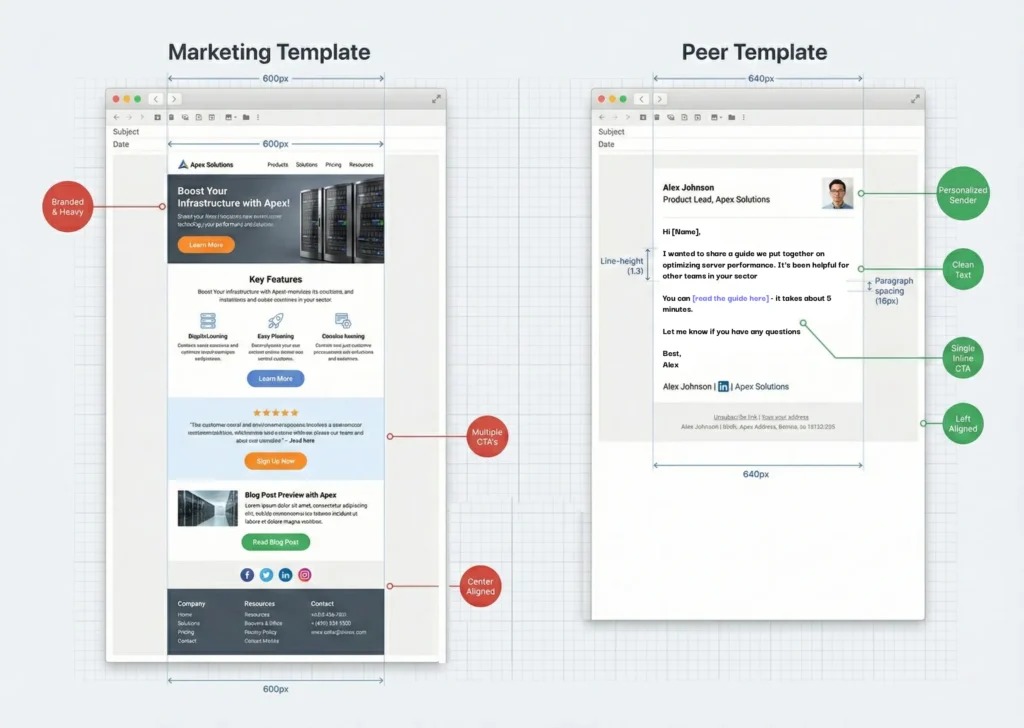
- Use a readable email width. A practical range is 600 to 650 pixels. We have seen 640 pixels work well because it feels like a natural reading width without looking like a narrow marketing module.
- Give the copy room to breathe. Use comfortable line spacing and paragraph spacing. A good working range is roughly 1.1 to 1.4 line height, with clear separation between paragraphs. The point is to make scanning effortless.
- Keep the structure simple. An effective pattern is a short intro of two or three sentences, then a few bullets or “snapshots” that preview what is inside the asset, then a short close. Another pattern that works is a more narrative flow that reads like a strong LinkedIn post, with whitespace and a clear point of view. The common thread is readability and a clear promise.
- Minimize decorative elements. Reduce color, imagery, and visual blocks unless they directly improve clarity. Overproduction often signals “this is marketing,” which is exactly what you are trying to avoid in peer-to-peer.
- Humanize the sender through the signature. Use a real name, a real title, and a signature that looks like an actual person. Add a headshot. Add a one-line credibility signal if appropriate, like “14 years building B2B email programs.” Add a LinkedIn link, and optionally where you are working from. These are trust signals. The goal is to show you are not hiding.
- Keep the email coherent from top to bottom. The signature should match the rest of the email style. If the email is left-aligned and simple, but the signature is a giant branded graphic block, you lose the effect.
8. Domains, Authentication, and Trust Signals
Great content cannot overcome shaky sending practices. Stable domains and clean authentication are part of being a trustworthy peer in the inbox.
The Issue
Poor domain practices and weak authentication erode trust and hurt deliverability even when the content is strong. Inbox provider rules change without warning. You are always operating inside someone else’s algorithm, so you need guardrails.
The Principle
Show up in the inbox as a legitimate, stable sender with predictable signals.
How to Execute It
- Send from a consistent subdomain aligned to your brand. This gives you separation between mail streams and protection if something goes sideways. It also avoids the “shady domain” problem that kills trust in high-consideration markets.
- Configure SPF, DKIM, and DMARC correctly and make sure they are aligned. This is table stakes.
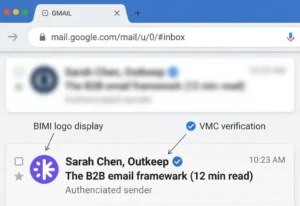
- If you want an advanced trust signal, consider BIMI and VMC if your brand is in a position to do it. BIMI is a DNS-based standard that can display your verified brand logo in supported inboxes when DMARC enforcement is configured properly. A VMC is the certificate that ties the logo to a trademarked mark. This is not a shortcut that magically fixes deliverability, but it is a legitimacy signal and can improve recognition.
- Avoid “burner” identities and spoof domains for enterprise motions. Churn-and-burn tactics can have a place in low-ticket, high-volume outbound, but they work against you when trust and brand reputation are part of the buying decision.
- Use display names that reflect a real person or a clear team identity. “Marketing Team” with no human behind it is a missed opportunity if your goal is peer-to-peer.
9. Unsubscribes, Compliance, and List Hygiene
Make it easy to leave, and you will protect your deliverability. People who cannot unsubscribe cleanly are the ones who complain.
The Issue
Hidden unsubscribe links and sloppy compliance harm deliverability, distort engagement metrics, and create unnecessary risk. They also increase the likelihood that a frustrated reader hits “spam” instead of leaving cleanly.
The Principle
Make opting out simple and transparent.
How to Execute It
- Use clear unsubscribe links in the footer. Do not hide them, shrink them, or style them to disappear. If someone wants out, let them out.
- Enable list-unsubscribe headers for supported clients so mailbox providers can present a native unsubscribe option near the subject line.
- Include a valid physical mailing address and the standard compliance elements your program requires. If you are going to send peer-style emails, do not undermine trust by missing basic compliance.
- Remove chronically unengaged or problematic contacts. Unsubscribes are normal. Spam complaints are the real risk. Treat complainers as loud feedback and stop mailing them.
- Treat unsubscribes as list management, not a failure. If your content is relevant and your expectations are clear, unsubscribes should be stable and informative.
10. Cadence and Message Rhythm Across the Program
Consistency builds familiarity, and familiarity builds trust. A predictable rhythm also makes your data easier to interpret.
The Issue
Inconsistent cadence, random bursts, and overly complex newsletters weaken signal, reduce familiarity, and make performance harder to interpret. Many programs accidentally train the audience to ignore them because sends feel unpredictable.
The Principle
Use a consistent rhythm with focused, single-topic messages.
How to Execute It
- Choose a predictable cadence and maintain it through the quarter. Consistency matters because it builds familiarity. Familiarity is part of trust.
- Favor focused emails over broad multi-topic newsletters when you are building or rebuilding a relationship with a segment. A newsletter can work once trust is established, but early on it often creates too many decisions for the reader.
- Highlight one topic or asset per send so engagement is easier to interpret. If you want a learning loop, you need clean tests.
- Align cadence with your audience’s attention patterns and your internal content pipeline. The best cadence is the one you can sustain with quality.
- Document learnings and update messaging based on trends, not one-off spikes. Email performance is noisy. Your job is to detect patterns, not chase anomalies.
11. Context on Outkeep’s Approach (Non-Sales)
This is how we try to operate ourselves: treat email like a system, not a stunt. The point is signal, trust, and consistency.
Outkeep applies these principles in its own programs by treating email as a learning system, maintaining clean audience definitions, and focusing on clarity and continuity from inbox to asset. The intent is not to “hack” performance. The intent is to earn trust, reduce friction, and generate signal that can be reused across the broader go-to-market motion.
This guide reflects patterns observed across multiple operators and environments rather than any single product capability.
12. FAQ for Modern B2B Email Programs
These are the questions that come up every time a team moves toward a simpler, more peer-style program.
What is BIMI?
BIMI is a DNS-based standard that displays a verified brand logo in supported inboxes when DMARC enforcement is properly configured. It is a trust signal and recognition layer, not a deliverability shortcut.
Do subject lines impact deliverability?
Only indirectly. Subject lines influence opens and engagement. Over time, engagement can influence inbox placement. The primary goal is clarity and alignment, not gaming deliverability.
How often should B2B teams email their audience?
Use a consistent rhythm the audience can anticipate. Frequency depends on content quality, segmentation, and relevance more than any universal benchmark.
Should all ebooks or reports be gated?
Not necessarily. Early-stage or broad-audience content often performs better ungated, especially when the goal is to establish relevance and trust rather than generate form fills.
Do peer-style templates replace brand templates?
No. Peer-style layouts are strong for focused messages that communicate a clear idea. Brand-heavy templates can still make sense for product launches, major announcements, or multi-asset communications where design improves clarity.
Is warming a domain still necessary?
It depends on volume and history. Stable, authenticated sending from a consistent domain and consistent mail streams is more important than artificial warm-up routines.
Do unsubscribes hurt deliverability?
No. Unsubscribes are normal. Spam complaints are what create risk, along with poor authentication and inconsistent sending practices.